PPM
PRINCE2 in Practice: A Practical Guide with Templates, Tools & Training Links
Last updated: 3 July 2026
If you're a professional exploring or working in project management, this one is for you! I was in Malaga on Good Friday 2025 when this session happened, but that didn't stop us running through a high level overview of the PRINCE2 methodology. In this article you'll find:
- •The session recording
- •Key insights from the session
- •The link to download 2 templates
- •A guide to key links for training providers if you want to explore accreditations in Project Management
Session Recording
PRINCE2 Knowledge Sharing Session Recording
Key Insights
Overview of PRINCE2 Framework
- •Developed by the UK Government in the 1980s to reduce waste in public projects.
- •Stands for “Projects in Controlled Environments”.
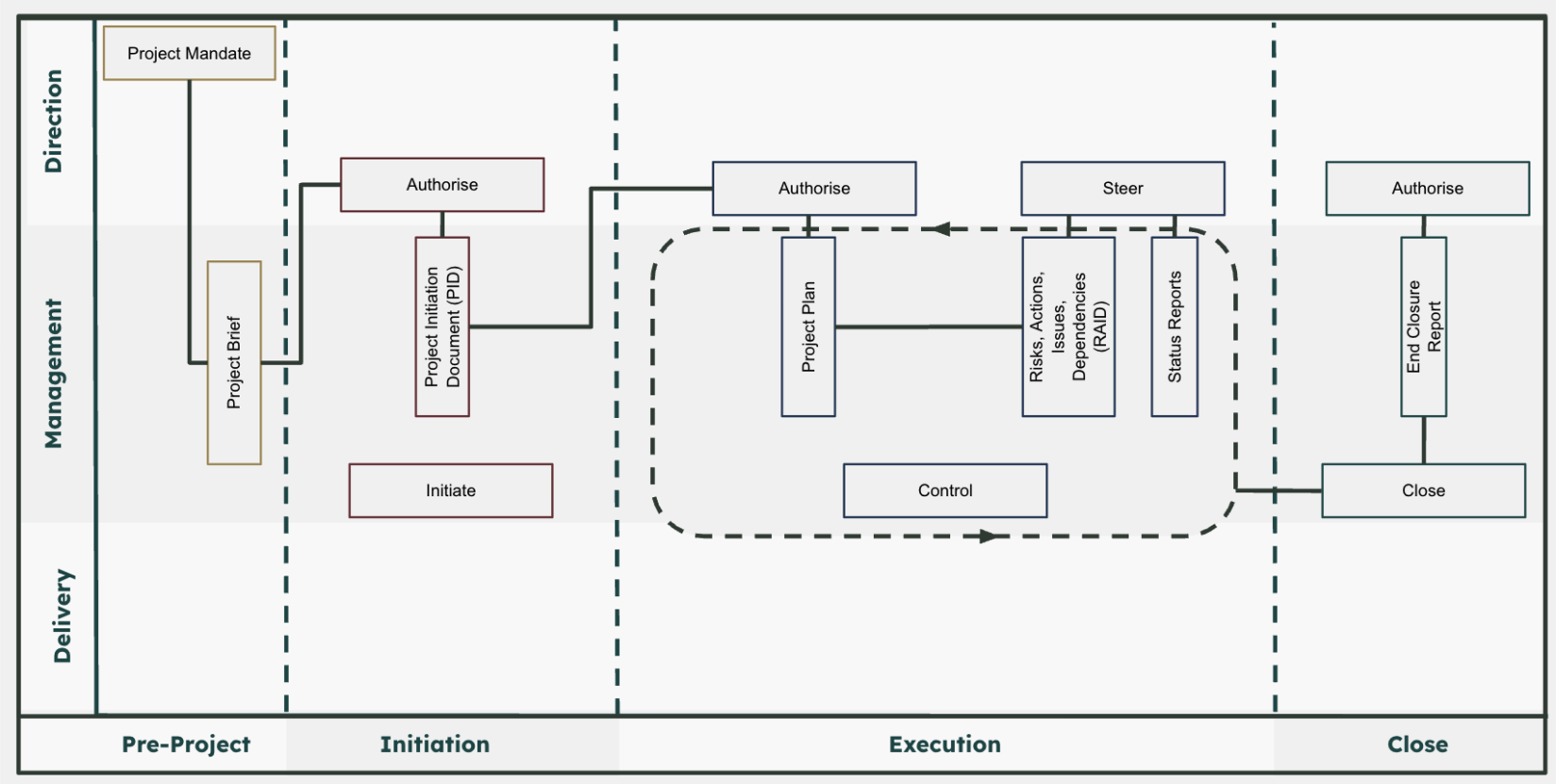
- •Structured across three layers:
- ○Direction: Executive sponsor oversight
- ○Management: Project manager accountability
- ○Delivery: Implementation teams
- •Stage gates (dotted lines in the process model) ensure controlled transitions between project phases.
- •Emphasis on the project manager role as central in communication between project sponsors and the delivery team.
PRINCE2 Framework: Direction, Management, and Delivery Layers
Key Project Documents & Concepts
Project Mandate
The project mandate is the original idea or trigger from senior leadership.
It should capture:
- •Background & context
- •Objectives
- •Scope (in/out)
- •Key stakeholders
- •Initial justifications
- •Sponsor details
It's important to capture these early, even if informally, to avoid confusion later.
Project Brief
The project brief expands on the mandate.
It should include:
- •Team structure
- •Early breakdown of work (WBS)
- •Initial project plan
- •Risk & issue identification
- •Governance structure (e.g. meeting cadence)
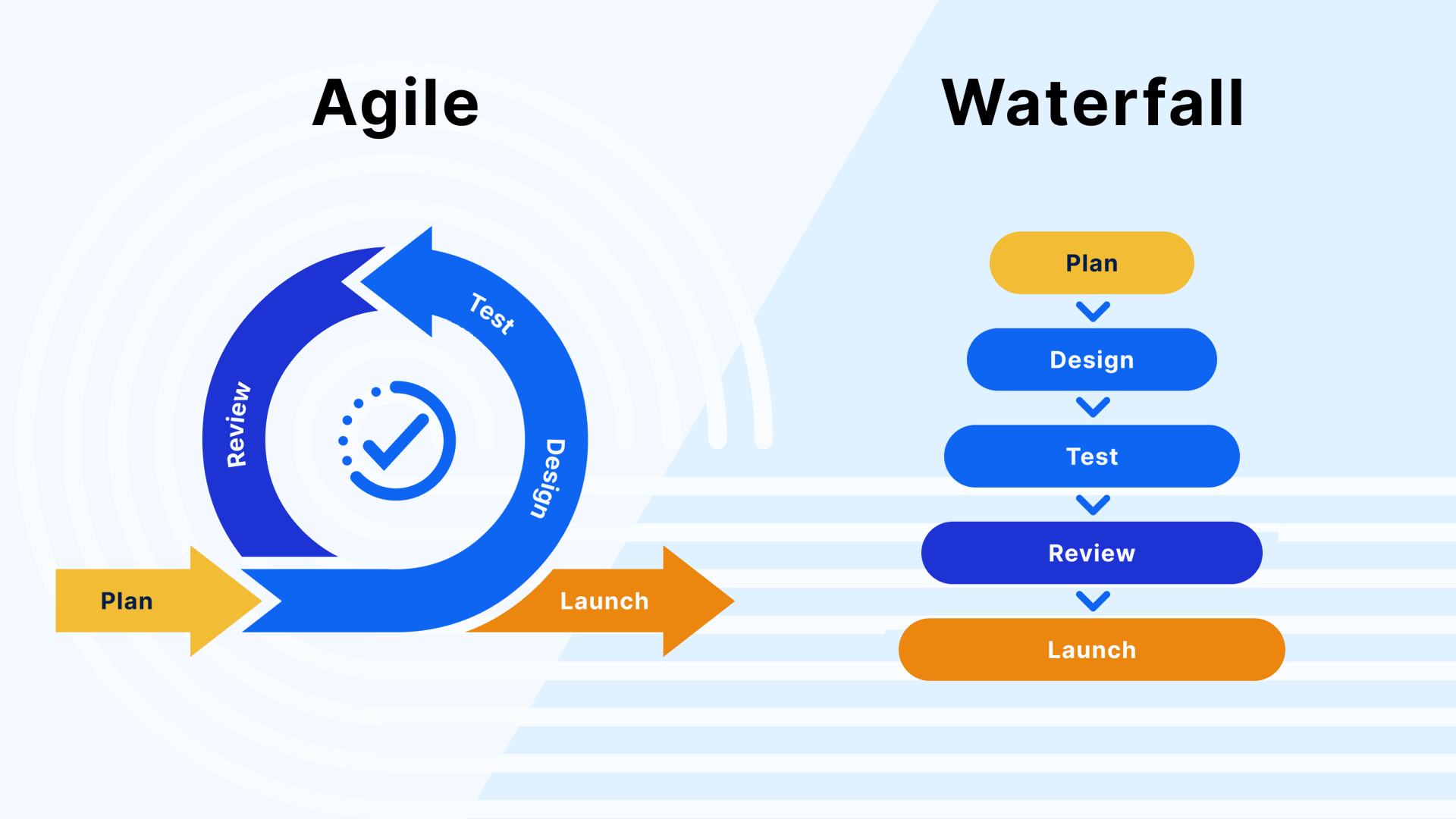
- •Delivery approach (Waterfall, Agile/Scrum, Hybrid)
Project Initiation Document (PID)
The PID is a more formal, more detailed version of the brief and mandate.
It adds:
- •Business case (including financial costs/benefits)
- •High-level solution visuals (diagrams/models)
In real life, the project mandate, brief and PID documents often blend together—what matters is the key concepts, not the document names.
PRINCE2 vs SAFe vs Scrum: when to use each
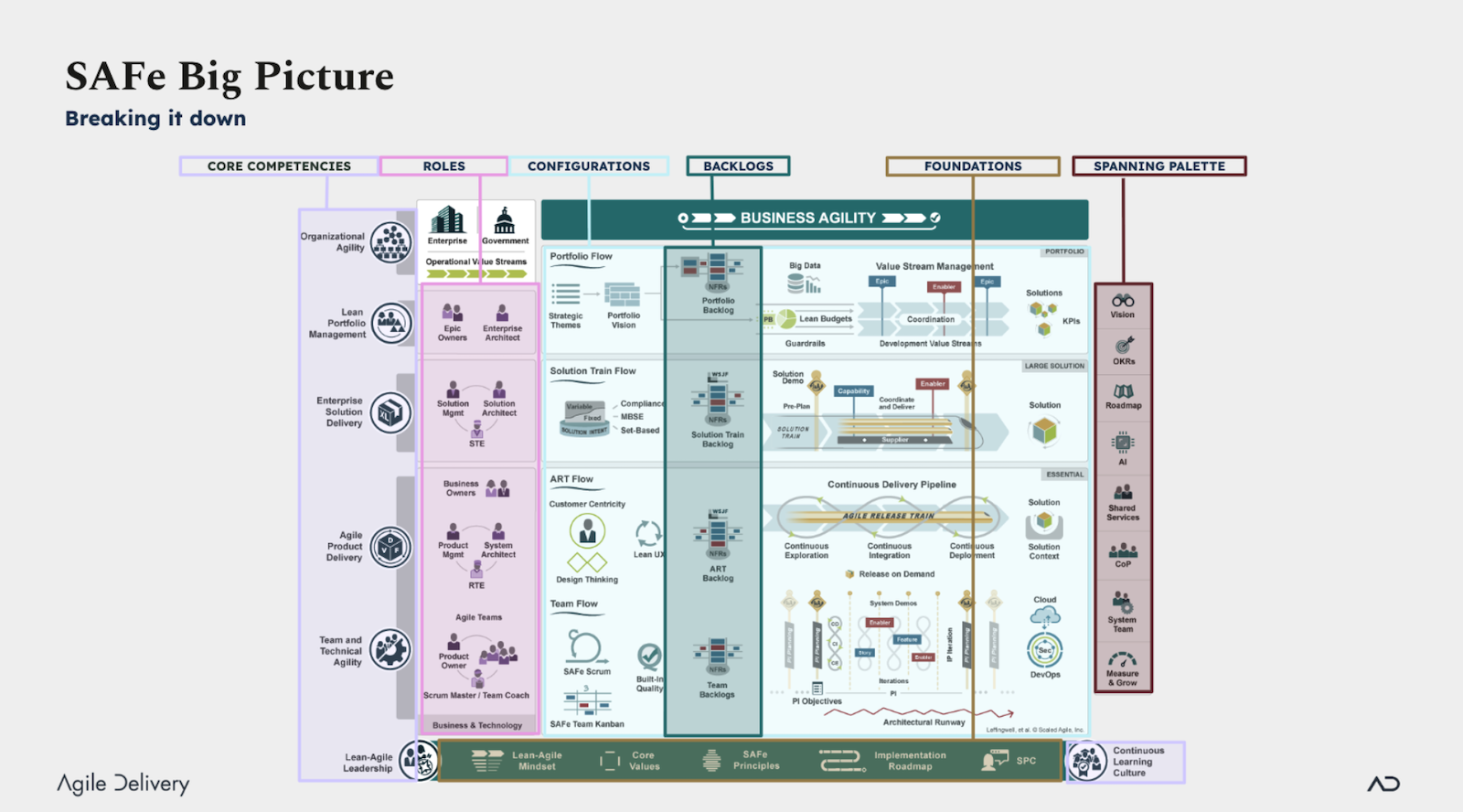
People often ask which of these to use. They solve different problems, so the answer depends on scale, how much governance you need, and how much change you expect. The table below sets them side by side.
| Dimension | PRINCE2 | SAFe | Scrum |
|---|---|---|---|
| Best for | Predictable, stage-based projects with a clear business case, common in the public sector and regulated settings | Coordinating many Agile teams on a large product or programme across an enterprise | A single team delivering iteratively where requirements keep evolving |
| Governance emphasis | High: defined roles, stage gates and a project board that directs by exception | Portfolio and programme level through Agile Release Trains and Lean budgets | Light: the team self-organises around Product Owner, Scrum Master and Developer roles |
| Team scope | One project team under a single project manager | Multiple teams; a release train typically runs 50 to 125 people | One small team, usually 10 people or fewer |
| Change approach | Controlled: changes are assessed against the business case through formal change control | Continuous: work is reprioritised at each Program Increment planning cycle | Expected: the backlog is re-ordered every sprint |
| Certification | PRINCE2 Foundation and Practitioner (PeopleCert) | SAFe Agilist and role-based courses (Scaled Agile, Inc.) | Professional Scrum Master (Scrum.org) or Certified ScrumMaster (Scrum Alliance) |
A side-by-side view of PRINCE2, SAFe and Scrum across five practical dimensions.
“What matters is the key concepts, not the document names – PRINCE2 is about structure and control, not bureaucracy.”
Template Download Link
Inside this folder, you'll find the Project Plan and RAID template discussed in the knowledge-sharing session.
These files are free to use and download — no login or Gmail account is required. Just click on any file to preview it in your browser, and if you'd like a local copy, right-click and choose “Download”.
Project Plan
Excel-based Gantt chart with:
- •Phase breakdown
- •Planned vs actual start/end dates
- •Colour-coded status indicators (grey, purple, blue)
- •Dependencies via cell formulas
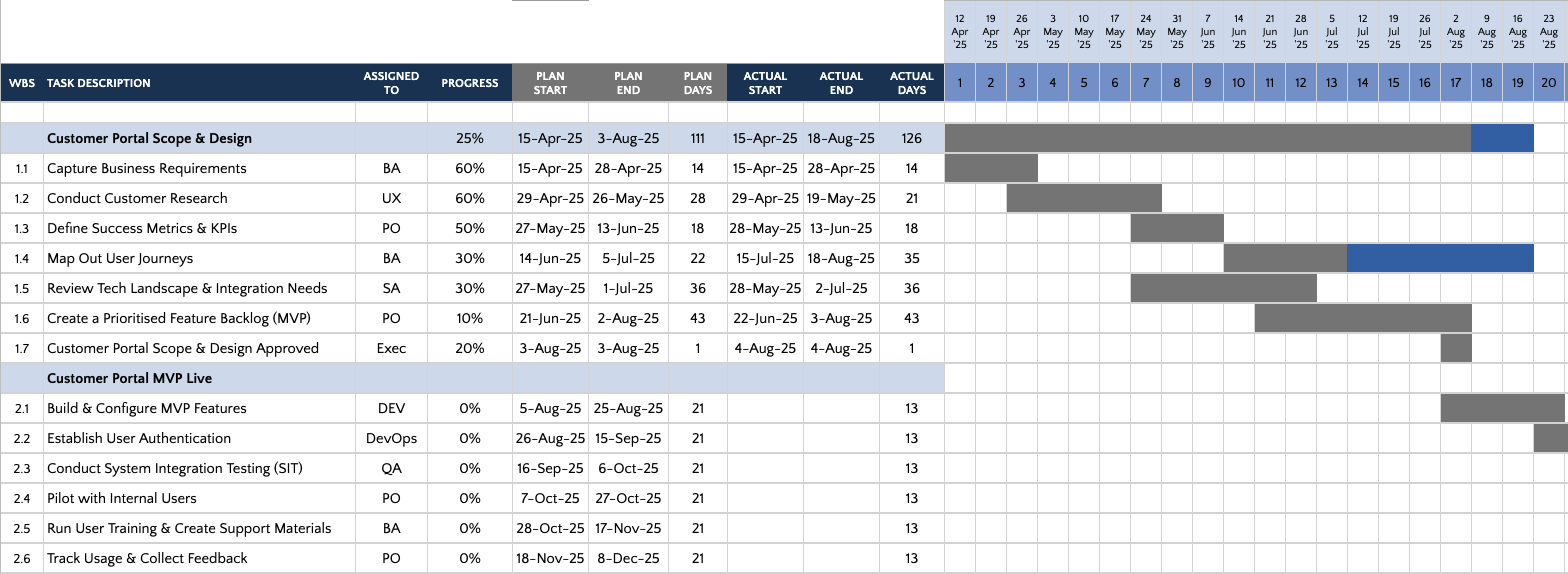
Excel-based Gantt Chart Template
RAID Log (Risks, Assumptions, Issues, Dependencies)
Excel log with:
- •Category
- •Description
- •Impact
- •Owner
- •Priority (e.g. RPN)
- •Status
The template includes an auto-generating dashboard for RAG overview.
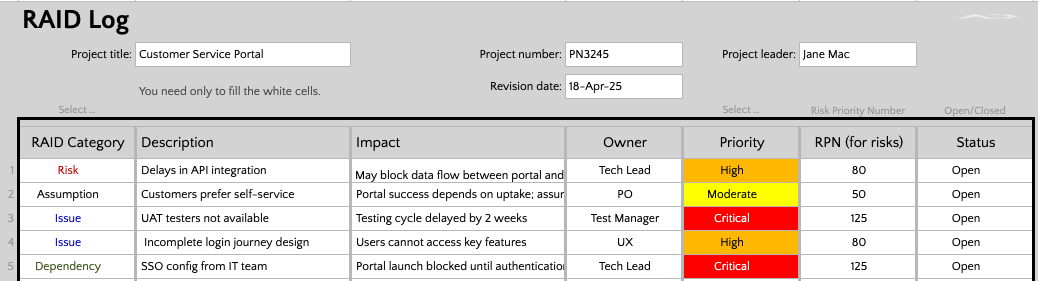
RAID Log with Auto-generating Dashboard
Status Reporting
Key components of effective status reporting include:
- •Project overview ribbon (timelines, scope, RAG)
- •Summary of previous/current activity
- •What help is needed from stakeholders
- •High-level milestone visuals
- •Top issues/risks highlighted for review
Project Closure
Key elements of a good closure process:
- •Review of timelines, budget, outcomes
- •Lessons learned
- •Outstanding actions & handover notes
- •Formal sign-off from sponsors
Accredited Training
At the end of the session, there were questions on recommended organisations to get project accreditations from, so I have created a reference document for you to be able to see my recommendations. Press the download button to view this resource.
Accredited Training Providers Guide
Download the comprehensive reference document with recommended organisations for project management accreditations.
PDF document • Free resource
Further Reading & Related Articles
I have lots of project management related articles to explore further. Check them out here:
Courses & Next Steps
And if you want to continue your learning journey, check out my expert led online courses below:
- •SAFe Scaled Agile
- •PRINCE2 Essentials
- •Agile & Scrum Fundamentals
Explore all courses on the training page.
Ready to elevate your project management practice?
Let's connectAuthor